Global workforce management

Your workday. One app. Anywhere.

EscoHR puts the tools you need right at your fingertips. Get started with your workspace, check shifts, track time, request leave, manage tasks, chat across languages, and stay up to date — all from your phone.

Simple. Connected. Built for today’s workforce.

Use your existing Escochex Payroll access. No separate EscoHR account is created.

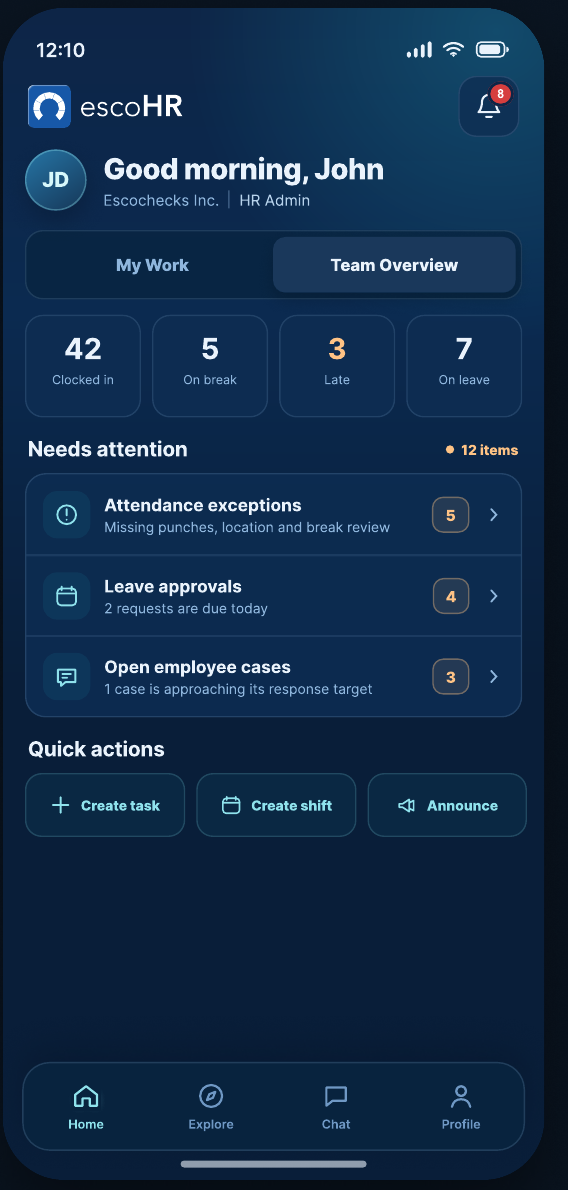
EscoHR employee home showing today's shift, clock-in, assigned task and case update EscoHR HR Admin home showing team overview, attendance exceptions and leave approvals
Two role-aware experiences. One connected workforce.
Designed around the day

Less hunting. More doing.

EscoHR opens to what matters now: the next shift, the current attendance action, pending work, an HR response, or the team exception that needs attention.

01

Attendance that fits the moment

Clock in or out, manage breaks, view time history, and request corrections with clear timestamps and status.

02

Schedules and leave in your pocket

See shifts, request trades, review leave balances, submit requests, and track decisions from the same mobile flow.

03

Work and support stay organized

Complete assigned tasks, keep personal to-dos private, and open employee cases that preserve responses and history.

For employees

Know what needs attention today.

The employee experience is built for clarity: your shift, attendance state, work, leave, case updates, company communication, and the next useful action.

  • Clock in and out with event-based location when enabled.
  • View schedules and request shift trades.
  • Request leave and track the decision.
  • Complete assigned tasks while keeping personal to-dos private.
  • Open private HR cases and follow their status.
See employee features
Attendance screenLeave request screen
For HR Admins

Start with the exceptions, not another dashboard.

HR Admin views prioritize operational work: attendance exceptions, leave approvals, open employee cases, schedules, tasks, and team status.

  • Review missing punches, location exceptions, and corrections.
  • Publish schedules and validate shift trades.
  • Approve or return leave requests with a reason.
  • Create and reassign employee work with preserved history.
  • Respond to private employee cases within assigned access.
See HR Admin features
HR Admin team overviewSchedule publish review
Privacy by design

Location when it matters. Not all day.

EscoHR's attendance design uses location at clock events to confirm a worksite or approved remote location. It is not designed for continuous location tracking.

Event-based locationRole-aware accessPrivate employee casesJust-in-time permissions
Your Escochex identity stays in control.

Accounts, company access, assigned roles, and password management remain tied to Escochex Payroll. EscoHR reflects the access your organization has already assigned.

A closer look

Built for real workforce actions.

Actual product screens from the EscoHR design system — not generic dashboard mockups.

Attendance confirmation

Recorded with context

Clock events carry the time, shift, location context, and sync status.

Shift trade request

Shift trades with validation

Employees propose an eligible coworker before HR review.

Assigned task detail

Assigned work with history

Checklist progress, priority, attachments, and activity stay together.

Create a private HR case

A private route to HR

Create a categorized case and choose an authorized HR recipient.

Get EscoHR

Take your workday with you.

Download links can be activated as soon as the store listings are live. Employees sign in with existing Escochex Payroll access provided by their organization.

Questions

Before you sign in.

EscoHR is designed as a companion to workforce access managed through Escochex Payroll.

Do I create a new EscoHR account?

No. The product design uses your existing Escochex Payroll identity. Your organization manages your account, role, and company access.

Does EscoHR continuously track my location?

No. The attendance design captures location only at attendance events when location permission is enabled. If location is unavailable, the record may require an exception and HR review.

What can employees do in the current EscoHR MVP?

The current MVP focuses on workspace onboarding/access, attendance and time tracking, schedules, shift trades, leave, assigned tasks, personal to-dos, private HR cases, multilingual communication, announcements, notifications, and workforce content.

Where do I reset my password?

Password changes are managed through Escochex Payroll. EscoHR hands users back to Escochex Payroll for password reset and account access changes.